
ASP.NET AJAX ScriptManager JavaScript Files
I have been doing a bit of experimentation with ASP.NET AJAX (in this particular case .NET 3.5) and came across a nice feature of the ScriptManager and what it renders for the Microsoft AJAX JavaScript files. I just thought this sheds a bit more light on the operations of the ScriptManager and ASP.NET AJAX, and since you can never have enough knowledge, here it goes…
As you may or may not know, when you add a ScriptManager to the page, two JavaScript resources are pushed down to browser (via ScriptResource.axd): MicrosoftAjax.js and MicrosoftAjaxWebForms.js. These two files make it possible for you to use the JavaScript Microsoft AJAX Library extensions. Now for the cool part, if you look at MicrosoftAjax.js and MicrosoftAjaxWebForms.js you’ll see it’s very hard to read since there are no line breaks or formatting, and because of this, almost impossible to debug. See Figure 1 below for what MicrosoftAjax.js looks like to the browser.
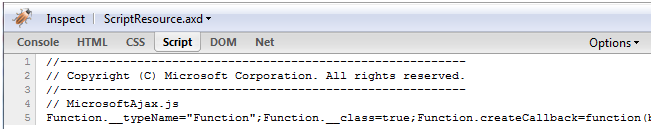
Figure 1 - MicrosotAjax.js
Now, you may not be seeing this particular view if you fire up Firebug and look for yourself. You may see something more like Figure 2:
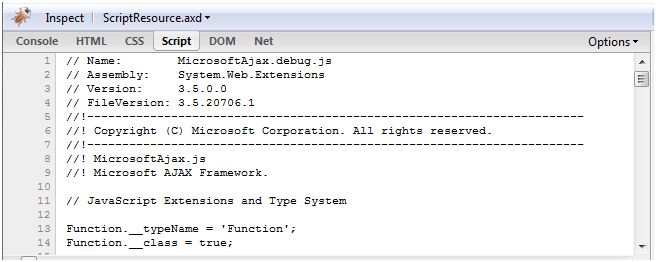
Figure 2 – MicrosotAjax.debug.js
That’s MUCH better for debugging, isn’t it? What controls this rendering you ask? Simple, it’s the compilation debug setting your web.config:
<system.web>
<compilation debug="true">
...
</compilation>
...
</system.web>
As I’m sure you aware, compilation debug should be set to false when you deploy your application, but is typically set to true when developing.
While you can see I’m using AJAX in .NET 3.5 in this example, this feature of the ScriptManager holds true for the ASP.NET AJAX Extensions for ASP.NET 2.0.
Hopefully this gives you a little more insight into the operations of the ScriptManager and ASP.NET AJAX. Not sure if you’ve noticed this feature, but it sure is a nice one!

Damien White Twitter
Hi, my name is Damien White. I'm a software architect with over 20 years of experience. I simply love coding! I have a driving passion for software development, and a thirst for knowledge that cannot be quenched. I enjoy writing Web and Mobile applications, and I'm happy to share what I know in my quest to learn as much as possible.