
ASP.NET AJAX Page Methods
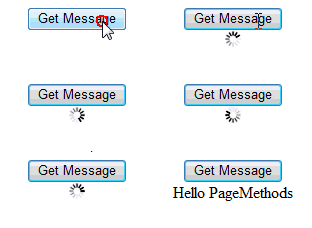
If you’ve read things of mine, such as my Wrox Blox Hands On ASP.NET AJAX Control Toolkit, or posts on the ASP.NET Forums, you may have noticed I talk about using ASP.NET AJAX Page Methods lots of the time. Lots of developers using ASP.NET AJAX overuse the UpdatePanel, or use it in situations where it doesn’t make sense. One example of this that I explore in my book is the comparison between using an UpdatePanel for a cascading drop-down effect vs. using the ASP.NET AJAX Control Toolkit’s CascadingDropDown Control with Page Methods. In short, the CascadingDropDown was far more efficient. Most of the time the reasoning for choosing the UpdatePanel is that developers don’t “think” about the repercussions of the UpdatePanel, nor do they think about other approaches to the problems they’re trying to solve. One of my favorite posts on UpdatePanels that I constantly refer developers to is Dave Ward’s blog post titled “Why ASP.NET AJAX UpdatePanels Are Dangerous”. The post does a great job of discussing the point of UpdatePanel overuse and gives an example of using Page Methods for a task instead of the UpdatePanel. Since I still encounter developers who fall into the UpdatePanel trap, I figured it would be a good idea to discuss Page Methods a bit further.
What are ASP.NET AJAX Page Methods?
Simply put, a Page Method is a page specific WebMethod. Instead of creating a full web service for your method, you can conveniently create a method in your page and use it from client-script. Let’s look at how simple it is to use them:
- Add a ScriptManager to your page, this is needed for ASP.NET AJAX interactions of any type (UpdatePanel, AJAX Control Toolkit, etc).
- Set the EnablePageMethods property of the ScriptManager equal to true.
- In the server-side code for the Page, create a static (Shared in VB) method and decorate it with the WebMethod attribute. (Note the WebMethodAttribute is located in the namespace System.Web.Services)
- Use the server-side method from client-side code by simply making a call to PageMethods.YourMethodName;
- Process the server callback. Remember AJAX is asynchronous, so in step 4, we make the request and we need to pass it the callback function in order to process the result. In some cases, you may not need this step, but typically you always are requesting something from the server.
That’s it. Now lets put this together in a small example.
ASPX Code (Steps 1, 2, 4, and 5)
<%@ Page Language="C#" AutoEventWireup="true" CodeBehind="BasicExample.aspx.cs" Inherits="VisoftInc.Samples.BasicExample" %>
<!DOCTYPE html PUBLIC "-//W3C//DTD XHTML 1.0 Transitional//EN" "http://www.w3.org/TR/xhtml1/DTD/xhtml1-transitional.dtd">
<html xmlns="http://www.w3.org/1999/xhtml" >
<head runat="server">
    <title>Visoft, Inc :: Samples :: Using PageMethods :: Basic Example</title>
</head>
<body>
    <script language="javascript" type="text/javascript">
       // Step 4: Use the PageMethod from code
       function getServerGreeting() {
           $get("MessagePlaceholder").innerHTML =
               "<img alt="Please Wait" src="image\ajaxwait01.gif" />";
           // NOTE: Instead of using getElementById in the last
           // statement, ASP.AJAX has a shortcut to this method
           // that does the same thing, $get.

           // Call the server method
           PageMethods.GetGreeting(getServerGreeting_Success);
       }

       // Step 5: Process the callback
       function getServerGreeting_Success(result) {
           /// <summary>
           /// This is the callback method to handle the
           /// result from the server.
           /// </summary>
           /// <param name="result">The result from the server</param>
           $get("MessagePlaceholder").innerHTML = result;
       }
    </script>
    <form id="form1" runat="server">
        <div style="text-align:center; width:200px;">
            <!-- Step 1: Add a ScriptManager to the page -->
            <!-- Step 2: Set the EnablePageMethods property to true -->
            <asp:scriptmanager id="sm" runat="server" enablepagemethods="true" />
            <input type="button" value="Get Message" onclick="getServerGreeting()" style="width:100px;" />
            <div id="MessagePlaceholder"></div>
        </div>
    </form>
</body>
</html>
Code-Behind (Step 3)
using System.Threading;
using System.Web.Services;

namespace VisoftInc.Samples
{
    public partial class BasicExample : System.Web.UI.Page
    {
        /// <summary>
        /// Simple method which returns a string greeting
        /// </summary>
        /// <returns>string</returns>
        [WebMethod]
        public static string GetGreeting()
        {
            // Step 3: Create a static method and decorate it with
            //         the WebMethod attribute

            // In order to slow the method down a bit to illustrate
            // the async call, have the method wait 2 seconds.
            Thread.Sleep(2000);

            // Return the result
            return "Hello PageMethods";
        }
    }
}
The previous code sample shows all the steps put together. Like all good beginning examples, this one follows the “Hello World” model. You can see where each step is completed by looking at the inline comments. This is the demo you saw in the section above (repeated here off to the right, so you don’t need to scroll back up). In order to make things look a little nicer, I added an AJAX wait image like you see in most AJAX applications while it is waiting to get data from the server. You can get your own customized animations at ajaxload.info. In the example above, the page structure is extremely simple, just a button and a DIV. When the button is clicked, the JavaScript method calls out to the server’s Page Method and passes the reference to the callback function. In this particular case, we are only handling a success callback. Later we’ll look at handling other events like an error, plus we will see how to pass parameters to the server method. In the success callback, the message returned is added to the DIV.
A Look Under The Hood
All of the Page Method magic happens thanks to ASP.NET AJAX. If you view the rendered source from the BasicExample from above, you’ll see the Page Methods JavaScript code.
Here’s a snapshot from Firebug:
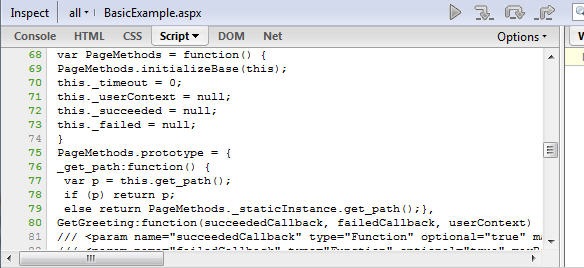
I won’t list the full source, since it’s available in any page where PageMethods are enabled. This is similar to the proxy that is created when you add a web service and expose it to client script.
Page Method Parameters
Back in the first example, the only event that was captured was the success callback. How would you pass parameters required by the server method? In addition, what other events can be captured in client-script? The Page Method is just like a web service call from the client-side’s perspective, because of this it follows the web service pattern. The following parameters can be used when calling a Page Method:
-
Completion Callback -A client-side method that will be called when the Page Method returns successfully. You saw this used back in the first example.
-
Error Callback - A client-side method that will be called if the Page Method errors. The error callback will also be called if the Page Method timed out.
-
Context - An object that will be passed to the callbacks.
Before these three parameters, you would include any parameters needed for your server-side method as you’ll see in the next example.
To show the example of parameters in use, we’ll start with the server-side code, two static methods. One that errors and one that waits so that we can see a timeout. These simple methods will take a “command” from the client, just to illustrate passing a value to the server from client-side code.
/// <summary>
/// This method illustrates throwing an error back to the client
/// </summary>
/// <param name="cmd">A string of the command to process</param>
[WebMethod]
public static void ProcessCommandError(string cmd)
{
  throw new ApplicationException(cmd + " is an unknown command.");
}
/// <summary>
/// This method illustrates a timeout by waiting
/// </summary>
/// <param name="cmd">A string of the command to process</param>
[WebMethod]
public static void ProcessCommandTimeout(string cmd)
{
    Thread.Sleep(5000);
}
Not too much going on there that needs explanation, now on to the client-side code…
<%@ Page Language="C#" AutoEventWireup="true" CodeBehind="Parameters.aspx.cs" Inherits="VisoftInc.Samples.Parameters" %>
<!DOCTYPE html PUBLIC "-//W3C//DTD XHTML 1.0 Transitional//EN" "http://www.w3.org/TR/xhtml1/DTD/xhtml1-transitional.dtd">    <html xmlns="http://www.w3.org/1999/xhtml" >
  <head runat="server">
    <title>Visoft, Inc :: Samples :: Using PageMethods :: Parameters</title>
  </head>
  <body>
    <script language="javascript" type="text/javascript">
      // **** Test Methods
      function testTimeout(command) {
        PageMethods.set_timeout(1000);
        PageMethods.ProcessCommandTimeout(
          command,
          completeCallback,
          errorCallback,
          "testTimeout");
      }

      function testError(command) {
      PageMethods.ProcessCommandError(
        command,
        completeCallback,
        errorCallback,
        "testError");
      }

      // **** Callbacks ****
      function completeCallback(result, response, context) {
        $get("MessagePlaceholder").innerHTML = context + " returned successfully.";
      }

      function errorCallback(result, response, context) {
        if (result._timedOut)
          $get("MessagePlaceholder").innerHTML = context + " timed out.";
        else
        $get("MessagePlaceholder").innerHTML = context + " errored.";
      }
    </script>
    <form id="form1" runat="server">
      <div style="text-align:center; width:200px;">
        <asp:scriptmanager id="sm" runat="server" enablepagemethods="true" />
        <input type="button" value="Timeout" onclick="testTimeout('Test Timeout')" style="width:100px;" />
        <input type="button" value="Error" onclick="testError('Test Error');" style="width:100px;" />
        <div id="MessagePlaceholder"></div>
      </div>
    </form>
  </body>
</html>
The code here looks similar to the first example, but notice the change in the parameters being passed. Note, in this example there isn’t any indication to the user that the server is processing since we are just looking at the parameters. First, you’ll notice that we are passing our “command” to the server, which is simply a string value. Next, we use the completion callback, then the error callback, and finally, for the context, we will just use the method name. In the error callback, you can see that we are testing the result for whether it is a timeout or not, and displaying a different message based on the error type.
You can see there are two test methods, testTimeout and testError. These call the server side Page Methods, ProcessCommandTimeout and ProcessCommandError, respectively. To illustrate the error, I’m just throwing an exception server-side. For the timeout, I’m setting the timeout to only one second so that you can see the timeout. You can set the timeout for a Page Method by using PageMethods.settimeout(_milliseconds); which you can see in line 4 in the client-side code above.
Things to Note
As you can see, Page Methods are easy to use. There are many situations where they make much more sense than the UpdatePanel. Of course you could always use Web or WCF service, but both of these are overkill for certain page-level tasks. There are some things to note when using Page Methods.
- Page Methods MUST Be static (Shared in VB.NET) - For those of you who aren’t familiar with static methods, this basically means that the method is completely self-contained and cannot access things in the class. For example, this means you won’t be able to access server controls from inside a Page Method. This is where people start to tune out. Hang in there for a minute. Just because you can’t access the control server-side does not mean that you can’t manipulate it. For example, let’s say you are getting data from the server (say a database) and you need to fill in an ASP.NET TextBox. You won’t be able to set the Text property of the TextBox, but on the client-side you would be able to set the value property of the DOM INPUT element.
- Page Methods CAN access Session - Accessing Session with a Page Method is simple, just access it using the HttpContent, for example HttpContext.Current.Session[“myKey”]. I was disappointed to find out that Page Methods always have Session enabled unlike a typical WebMethod.
- Page Methods are specific to the page - if you need the functionality in multiple places, a Web or WCF service would be a better option.
Conclusion
I really like Page Methods, but again, for certain tasks. If your two choices for doing an asynchronous task are the UpdatePanel or a Page Method, you should always opt for the lighter-weight approach and choose the Page Method approach. Don’t get me wrong, I appreciate the Microsoft providing us with the UpdatePanel, but with simplicity comes inefficiency. I hope that developers add this approach to their toolkits, and next time they think of some design where there are have multiple UpdatePanels on the page, or they are performing a task like an Ad Rotator with an UpdatePanel and a Timer, that they will think, “hey, an UpdatePanel for this is silly.”
Source Code
Looking for the source code for this article? [Get it here!][2]
More Reading
Looking for more Page Method stuff? Here’s some links to check out:
- Why do ASP.NET AJAX page methods have to be static?
- Using jQuery to directly call ASP.NET AJAX page methods
- How to… move from AjaxPro to ASP.NET AJAX PageMethods
- Why ASP.NET AJAX UpdatePanels Are Dangerous
- Ajax Page Methods Will Always Have Session
- Are you making these 3 common ASP.NET AJAX mistakes?
[2]https://images.visoftinc.com/2008-09-07/usingpagemethods.zip

Damien White Twitter
Hi, my name is Damien White. I'm a software architect with over 20 years of experience. I simply love coding! I have a driving passion for software development, and a thirst for knowledge that cannot be quenched. I enjoy writing Web and Mobile applications, and I'm happy to share what I know in my quest to learn as much as possible.