
Using Exchange Web Services 2007: The Basics
Exchange Web Services (EWS) for Microsoft Exchange 2007 provides a quick an easy way to interface with Exchange data from anywhere without having to interface with ugly COM interop objects if you’re living in a managed world like C#. Today I was curious at how to get calendar appointments from Exchange into a readable format that I can use in another application, perhaps one that synchronizes appointments from exchange with those from other calendaring applications like Google’s calendaring feature. Also, I found the documentation about EWS hard to find and not very helpful, so this post will serve as a single source of good documentation for those who are getting started with EWS. All of the examples I give will assume you have a basic familiarity with the available operations that the web service offers you. Here are some great links to get you up to speed:
MSDN Getting Started With EWS: A 3 part intro to Exchange 2007 Web Services. EWS Operations: A list of the operations that can be performed on the EWS. FindItem Example in C#: An example of querying calendar items from EWS. Glen Scales’ Blog: This guy knows Exchange inside and out.
The Exchange Web Services module works off the concept of creating a soap message to send to Exchange that will tell the server what you’re looking for and then give you back a soap response. The only thing I find to be problematic in the EWS architecture is that the type objects that were used to comprise the API that C# developers will use to create these requests is almost a literal translation of the corresponding XML elements and attributes, which has a tendency of making the code bloated and a bit unintuitive. Regardless, anything is better than using the old ways of communicating with Exchange, so let’s continue.
The first step in communicating with Exchange is to obtain a proxy. This is an instance of the ExchangeServicesBinding class. With Visual Studio 2005, you can generate this proxy object by adding a web reference pointed at http://
Figure 1. Adding a web reference to the exchange services. 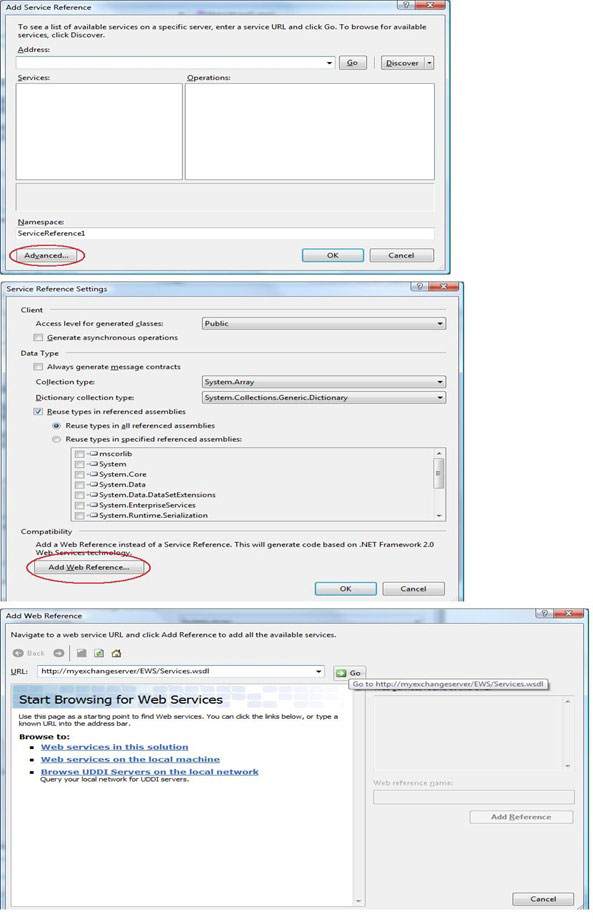
In the case you don’t want to go through using a web reference, you can use the wsdl.exe tool to generate the classes that you can then reference in your project. For more information about doing this, go here. Once you have the proxy, you will want to connect to it in order to post messages to it. The way to do this in C# is quite straightforward:
ExchangeServiceBinding esb = new ExchangeServiceBinding();
esb.Url = "http://<YourExchangeServer>/EWS/Exchange.asmx";
esb.Credentials = new NetworkCredential("username", "password", "domain");
Once authenticated, you will be connected to Exchange as the user in the credentials supplied. You can also use CredentialCache.DefaultCredentials if you are making a WinForms application and want to use the credentials of the logged in user when connecting to the exchange server. One thing to keep in mind when querying or creating items in exchange from this point is that all of these operations, with the exception of the free/busy time query, work off a single mailbox at a time, and this mailbox is initially that of the connected user. The solution if you need to see items from other users is to impersonate the target user(s) and perform the queries. There are 2 ways to accomplish this, one uses delegates and the other explicit impersonation.
Most operations in the Exchange Services proxy take objects that require you to specify which folders you will be working on. For example, if I wanted to look for messages that contain the subject “happy holidays”, I would probably want to look in the inbox, but also in the deleted items folder since I could have deleted the message I’m looking for. There is a property on the folder type object called Mailbox, and this allows you to specify another person’s mailbox when specifying the folder. So, assume I am connected to the Exchange Server as John Smith, but I need to find all appointments in Anne Dugger’s calendar folder. Here would be the code to use delegate access to accomplish this:
FindItemType fit = new FindItemType();
fit.ItemShape = new ItemResponseShapeType { BaseShape = DefaultShapeNamesType.Default };
fit.ParentFolderIds = new DistinguishedFolderIdType[]
{
    new DistinguishedFolderIdType
    {
        Mailbox = new EmailAddressType{ EmailAddress="adugger@contoso.com"},
        Id = DistinguishedFolderIdNameType.calendar
    }
};
fit.Traversal = ItemQueryTraversalType.Shallow;

FindItemResponseType firt = esb.FindItem(fit);
In the above example, the FindItemType is the class that we use to tell exchange to find items in a particular user’s folder. Here we’re specifying that we want to look in the Calendar folder of the user that has an email address of adugger@contoso.com. In order to use delegate impersonation to query Exchange, Anne Dugger would have to grant the connected user access to her calendar folder. This can be done in Outlook by going to tools->options and clicking on the Delegates tab. This tab is only visible if outlook is connected to an exchange server. This method is useful if the functionality you want to incorporate is opt-in as users can grant a particular system account delegate access to their mailbox so that automated tasks can be performed.
The second way to accomplish querying another user’s mailbox folders is explicit impersonation. This method is useful for scenarios where an Exchange Administrator wants to force one or more mailboxes to be maintainable by a system account. The setup for this scenario is a bit more complex and is covered in detail here. Once configured, we can programmatically invoke impersonation in C# through the following means. Using the same example as above, if John Smith’s account had been granted impersonation rights on Anne Dugger’s mailboxes, and I wanted to find all appointments in Anne Dugger’s Calendar folder, here is the C# code we would use:
ExchangeImpersonationType imp = new ExchangeImpersonationType();
imp.ConnectingSID = new ConnectingSIDType { PrimarySmtpAddress = "adugger@contoso.com" };
esb.ExchangeImpersonation = imp;

FindItemType fit = new FindItemType();
fit.ItemShape = new ItemResponseShapeType { BaseShape = DefaultShapeNamesType.Default };
fit.ParentFolderIds = new DistinguishedFolderIdType[]
{
     new DistinguishedFolderIdType{ Id = DistinguishedFolderIdNameType.calendar }
};
fit.Traversal = ItemQueryTraversalType.Shallow;

FindItemResponseType firt = esb.FindItem(fit);
As you can see from the code above, there is no longer a need to explicitly specify the mailbox when indicating which folders we will be searching. Instead, we tell the proxy instance that we are impersonating Anne Dugger’s account by specifying her email address in the ConnectingSID property of an ExchangeImpersonationType that we bind to the proxy instance. You can also use the principal name here if you desire, but note that this is may be different than the email address for the target user.
No matter which way you go about getting a user’s information, since you can only query one user at a time, you will probably want to employ your favorite threading techniques so that you can get multiple results back in a relatively short amount of time.
Let’s talk a bit about shapes. At least for the FindItem (and perhaps GetItem) service operations, there is a property called ItemShape. This property essentially defines what we expect to come back in the response message from Exchange. In the above example, We’re telling exchange to bring back the default properties for calendar items, but what if we wanted to include a couple of non standard properties in the result? Well, we can specify these in the AdditionalProperties Property of the ItemResponseShapeType class, as in the below example:
fit.ItemShape = new ItemResponseShapeType
{
   BaseShape = DefaultShapeNamesType.Default,
   AdditionalProperties = new PathToUnindexedFieldType[]
   {
      new PathToUnindexedFieldType{ FieldURI = UnindexedFieldURIType.calendarIsMeeting },
      new PathToExceptionFieldType{ FieldURI = UnindexedFieldURIType.calendarIsRecurring }
   }
};
The code above specifies that we want 2 custom properties to be returned, one indicating whether the appointment is a meeting and the other to indicate whether the appointment is recurring or not. We can then use these properties in the response should we have any logic for whether or not to process recurring meetings differently than other types of meeting.
Just as an aside, when searching for items in Exchange, you can specify grouping and paging options as well as restriction and sorting options. I won’t go into details about all of these, suffice it to say that the MSDN example in the link above shows all of these aspects of the FindItem operation.
So that wraps up the basics of how to connect to and impersonate with Exchange 2007 web services. I’ve only really played around with it for an hour, and it’s pretty obvious that I only really used the FindItem operation since I only needed basic properties to be returned about the appointments I was searching for. For more details about the appointments (like the invitees, etc) I would have to call GetItem on each item that was returned from FindItem, passing the Item’s id in as the reference. The API has the ability to do much more than search, I can programmatically create appointments, messages and contacts as well, but the underlying infrastructure is the same as it is for finding an item, so getting an understanding of it for the FindItem operation will translate to other operations as well.

Dave Marini
I am a full stack software architect with over 20 years of experience developing scalable, enterprise level applications targeted for Windows and the web. I have worked with a number of SPA front end frameworks, .NET middleware technologies, both relational and document databases and various big data search platforms. I'm currently interested in Microservice and Serverless architecture patterns.