
Often times, I have encounter questions regarding dynamically creating controls, specifically ones related to the ASP.NET AJAX Control Toolkit. Today, I was working with an application where I needed to create a dynamic CalendarExtender and thought I would post the results.
Here is a simple example of how to create a dynamic CalendarExtender from code-behind:
// Create a textbox to hold the date TextBox dateValue = new TextBox(); dateValue.ID = "dateValue"; // Create the calendar extender AjaxControlToolkit.CalendarExtender ajaxCalendar = new AjaxControlToolkit.CalendarExtender(); ajaxCalendar.ID = "ajaxCalendar"; ajaxCalendar.Format = "MM/dd/yyyy"; ajaxCalendar.TargetControlID = dateValue.ID; placeHolder1.Controls.Add(dateValue); placeHolder1.Controls.Add(ajaxCalendar);
In the ASPX, I have just a simple PlaceHolder where I append the dynamically created controls:
<asp:placeholder id="placeHolder1" runat="server"></asp:placeholder>
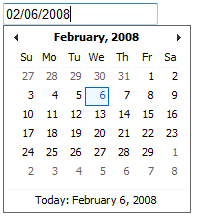
Finally, here’s the end result:
20 Comments
El problema que ustedes tienen lo pueden corregir de una manera facil sin buscar mas soluciones en foros y cosas similares, la solucion es que busquen la libreria del ajax en la ruta C:Users[user name]AppDataLocalMicrosoftVisualStudio8.0ProjectAssemblies y reemplacen la libreria por la de su proyecto.
Saludos,
Savindra -
I can’t seem to replicate your problem. I created a sample ASPX page with this code:
private void CreateCalendar()
{
TextBox dateValue = new TextBox();
dateValue.ID = "dateValue";
// Create the calendar extender
var ajaxCalendar = new AjaxControlToolkit.CalendarExtender();
ajaxCalendar.ID = "ajaxCalendar";
ajaxCalendar.Format = "MM/dd/yyyy";
ajaxCalendar.TargetControlID = dateValue.ID;
placeHolder1.Controls.Add(dateValue);
placeHolder1.Controls.Add(ajaxCalendar);
}
protected override void OnPreRender(EventArgs e)
{
base.OnPreRender(e);
CreateCalendar();
}
It all works as expected. I also tried declaring the calendar globally and intializing it in OnPreRender like your example. Even with that design, it still works as expected. I would recommend posting your code on the ASP.NET AJAX Forums (e.g http://forums.asp.net/1008.aspx) and asking the question there. If you do post your example there, let me know the URL.
-Damien
Hai Damien
I modified the code as above but there is no change in the error message
Thanks
Savindra.Bandi
Hello Damien
I modified the code.
but no cange in the error,is same as
Extender controls may not be registered after PreRender.
Thanks
Savindra.Bandi
Savindra -
Flip your OnPreRender around, for example:
protected override void OnPreRender(EventArgs e)
{
[b]base.OnPreRender(e);
calender= new AjaxControlToolkit.CalendarExtender(); (initialized as global value)[/b]
}
-Damien
Hello Damien
am using calender as
protected void CallCallender()
{
…. Code ….
calender= new AjaxControlToolkit.CalendarExtender();
calender.ID = "calformakepayment";
calender.TargetControlID = txtanswer.ID;
calender.Format = "MM/dd/yyyy";
calender.CssClass = "MyCalendar";
tblTabPaymentcolumn2.Controls.Add(calender); (here am attaching the calender to a asp table)
…. Code ….
}
and also am using the prerender as
protected override void OnPreRender(EventArgs e)
{
calender= new AjaxControlToolkit.CalendarExtender(); (initialized as global value)
base.OnPreRender(e);
}
I think this is wrong way of using can you please help me to clear the issuse
Thanks
Savindra.Bandi
Savindra -
Where are creating the calendar? If it’s in prerender event, move your code after the base.OnPreRender(e).
-Damien
Hello Damien
Thanks for your reply.
I have seen this blog, but am unabel to understand how to sole it
I used the code snap
protected override void OnPreRender(EventArgs e)
{
base.OnPreRender(e);
}
but no use is getting the same error
can you please help me to clear the issuse
Thanks
Savindra.Bandi
Savindra -
See http://jlchereau.blogspot.com/2007/03/extender-controls-may-not-be-registered.html
-Damien
Hai
Whwn I use the above code am getting an error message like
"Extender controls may not be registered after PreRender."
am not understanding why this error is raising.
can you please help me to clear the issuse
Thanks
Savindra.Bandi
Hi Damien,
Thanks for the reply and the link, I figured out a bit more yesterday, so thought of sharing as it might be useful for others, instead of passing in UpdateDueDate(‘ctrl’) in code behind I am just using UpdateDueDate. the javascript function takes two parameters UpdateDueDate(sender, args) using sender I can get the id of the textbox which is the target control and selected date using sender._id and sender._selectedDate.
Regards,
Santhosh
Santhosh -
See if this helps: http://forums.asp.net/t/1070206.aspx
Your problem may be the ‘ctrl’ param that you are passing in.
Hope this helps.
-Damien
Hi,
I am trying to add a onClientDateSelectionChanged event to a dynamically created a calendar extender but the page throws javascript error on line in the .js file used by calendar extender.
Basically I am assigning the client side function to the event like below
calDueDate.OnClientDateSelectionChanged = "UpdateDueDate(‘ctrl’);"
any idea what’s wrong with this?
Thanks,
Santhosh
Ken-
Great! Glad you fixed your problem.
-Damien
Hey Damien – Thanks a lot for all your help. I had downloaded the latest version, but apparently I didn’t install/update it properly. Just repeated the process – carefully – and the problem has been resolved.
Thanks for finding that related post – it was spot on – I’ve been googling around this error for days and haven’t come across that one.
Anyway, thanks again.
Ken
Ken -
I found a related ASP.NET Post, http://forums.asp.net/t/1071293.aspx. It’s old though and the fix was using the latest version.
-Damien
Ken -
I think I may have seen something like this in the past, but I believe it was related to an older version of the Control Toolkit. Are you using the latest version? If not, I would try downloading a newer version.
-Damien
Hi Damien
Thanks for replying so soon :-) … the issues you mentioned were OK, but I have since discovered some more info – it appears that the issue is somehow related to the "Format" parameter of the Calendar extender – if I set the format string to, say, "d/MMM/yyyy" (we being on the other side of the planet here), a javascript error occurs in the page to the effect that the variable "length" is null or not an object. I had a look at the javascript that was being executed and it seemed to have something to do with the date format, so I removed that parameter and bingo! everything works the way it should. This is a problem for me as I really need to get the date in the correct format, but at least it’s something to be going on with. Let me know if this issue rings any bells with you. BTW, the page is generated by an XSLT transformation.
Thanks again
Ken
Ken -
Make sure you are doing two things… recreate the controls at the correct time on each postback (e.g. PreLoad), and make sure that you have added IDs to all your dynamic controls.
Hope this helps.
-Damien
Hi
I have a page – on online form – to which I dynamically add AJAX control extenders in a manner similar to the above. The form user chooses a date (e.g.) and this answer is saved when the user saves the form. The next time the user opens the form (to continue filling it out), I load the saved answer to the textbox that is associated with the Calendar control extender. After this, however, the AJAX functionality ceases to work – in fact, all of the AJAX controls stop rendering – e.g. a slider down the page becomes two textboxes. However, when I delete the loaded answer in the textbox and re-save the form, the controls start to render again. Another interesting aspect is that a test control added to the page above the placeholder works fine – but the same control added below the placeholder does not. Any ideas?
Ken Arthur